✅ Put your name here.
✅ Put your group member names here.
Algorithmic Bias, Academic Integrity, Coding Best Practices, and Freezing Saguaros
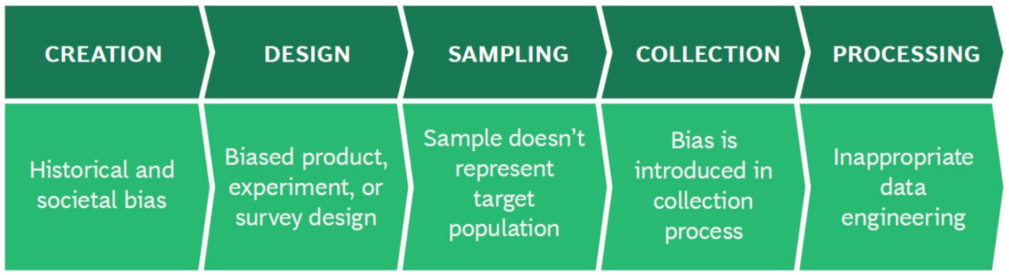
Credits: Beeck Center @ Georgetown University
Learning goals for today’s assignment
Identify how bias occurs in data and algorithms
Understand the impact data and algorithmic bias has on people
Apply practices to look for bias in your work and others, and minimize it
Search on duckduckgo for snippets of code and compose solutions with integrity
Construct variable names following best coding practices
Assignment instructions
Work with your group to complete this assignment. Instructions for submitting this assignment are at the end of the Notebook. The assignment is due at the end of class.
1. Discussing Data and Algorithmic Bias
In the Pre-class you explored the concepts of Data and Algorithmic Bias by watching a video and reading an article.
✅ Activity 1:
Go around the group and take about 2 minutes per person for each person to summarize their thoughts/reflections from the pre-class assignment. Record the results of your group discussion below. Make sure to include any observations made by your classmates that perhaps you didn’t think about when you did the pre-class assignment.
✎ Write your response here
2. Practice searching for snippets of code and constructing your own code
As stated in the pre-class, we want you to learn how to use the internet as a resource in your coding. In general, you should practice taking problems and breaking them into sub-problems. Searching on the internet for solutions to sub-problems is an important skill. It is also important to make sure that you do not take credit for someone else’s work as your own.
Guidelines for Using Code You Didn’t Write:
If you are using content to solve problems that has not been covered in our pre-class or in class assignments, you MUST cite your work. This includes any use of the resources reviewed today.
We have not yet discussed responsible and effective use of generative AI tools (and you are still learning the necessary basics!), so you are not encouraged to use it at this time (wait a few weeks!). However, if you do use generative AI tools, you must indicate which tool you used (e.g. chatGPT, Co-Pilot, Claude, etc.) and what lines of code were produced by generative AI and which ones were produced by you. Failure to properly cite your work may result in loss of points on the problem.
Also:
Rename all variables using variable names that make sense to you.
Use your own structure (i.e. order the code in a way that makes the most sense to you)
Add comments to help clarify complicated syntax
If you received substantive value from another source (for example, complicated syntax or > 5 lines of content), cite the source (Author, URL, and Date Accessed)
2.1 Construct a list of items and quantities for a greenhouse inventory list
✅ Task 2:.
Using the following two lists that have been provided, make a new list that contains all string-type variables such that the value at each index
iin the new list should be the concatenation of the values for indexifrom listsplantsandcounts.When complete, the final list should be
['arabidopsis_15', 'maize_45', 'soybean_6', 'rice_8', 'brachypodium_94', 'tomato_12']Remember: do not place this exact question into duckduckgo (or google).
You do not want to find the whole solution to a whole problem because:
You will not learn how to code on your own
You may feel tempted to plagiarize someone else’s complete work
You likely will waste time because the answer for this specific problem is not out there.
Instead, break this into smaller problems and search for those.
Potential duckduckgo search phrases:
python loop through a list
python concatenate values
Notice that when searching for ways to accomplish this task using Python, it is important to include “python” in your search phrase!
Talk with your group about other useful search phrases and share the resources you locate!
# Remember, if you use a source,
# 1) Rename the variables,
# 2) Use your own structure,
# 3) Add comments to help clarify complicated syntax
# 4) Cite the source if it provides substanative value

plants = ['arabidopsis', 'maize', 'soybean', 'rice', 'brachypodium', 'tomato']
counts = [15,45,6,8,94,12]

# Put your code here
3. Python Coding Conventions
Code is read much more often than it is written. ˜Guido van Rossum, Author of PEP8
There are several proposed Python Enhancement Proposals (PEP), with the goal to improve the readability and consistency of Python code. For now, we will focus on best practices for naming data types (variables, functions,etc) and for commenting code.
Name Conventions for Variables
Choosing sensible names will save you time and energy later.
Use descriptive names to make it clear what the object represents.
Use a lowercase word, or words.
Separate words with underscores to improve readability:
length_inches,list_groceries,my_variableNever use spaces in your names
Avoid single character names unless it is clear what it means (ex:
growth_rateis preferred tog)
Comment Conventions
Especially when learning to code, feel free to use comments often! This will help you understand your code and make it easier for you to review later. If you are tasked with a challenging task, use a comment block at the beginning to describe in your own words the goal of your code.
Now let’s apply these to a real world example!
## Just run these lines
## Make sure the Saguaro dataset is located in the same folder as this Notebook

import pandas as pd
import matplotlib.pyplot as plt

filename = 'HeightClasses_1941_to_2016_Survivorship.csv'
df = pd.read_csv(filename, index_col=0)
4. Catastrophic freezes and saguaro mortality
Let’s go back to the saguaro survivorship dataset from Orum et al (2016). Look especially at Table 2:
| Height Type | #(Dead between 2011 and 2012) | #(Survivors in 2012) | Mortality % |
|---|---|---|---|
| III | 4 | 0 | 100 |
| II | 9 | 5 | 64 |
| I | 8 | 33 | 20 |
Back in 2011 there was a catastrophic freeze in the Sonoran desert which killed several saguaros. However, the mortality of saguaros varied based on their height type/height class. To better gauge the class-specific damage, Orum et al. compared separately for Height Type 1, 2, and 3:
Number of surviving saguaros in 2011
Number of surviving saguaros in 2012
Number of saguaros that died between 2011 and 2012, i.e. the difference between the two numbers above.
Now let’s imagine you join the Saguaro Lab and you get a copy of the code used to compute the table above:
# Compare this line to in-class 03 (right at the start of Part 2)
a, b, c, d, e = [ df.iloc[:,index].tolist() for index in range(df.shape[1]) ]

# Code left behind by the previous student
f = 2011-1941
g =       2012 - 1941
h = [c,  b,  a]

for  L in h:


    j = L[f]
    k= L[f]-L[g]

    l =L[g]
    print   (j,k,l, 100*k/j)
4 4 0 100.0
14 9 5 64.28571428571429
41 8 33 19.51219512195122
✅ Question 3:
It is pretty clear that the code above does not follow coding conventions. Take some time to go through the code and understand what it is doing. Was the code hard to read? Why or why not?
✎ Write your response here
✅ Task 4:
Now that you have an idea of what the code is doing, rewrite the code following the Python coding conventions. Make sure to include comments to explain what the code is doing. Make sure that the print statements print interpretable results and not just numbers.
Feel free to look back at Day 3 for help, but use your own explanatory variable names that make the most sense to you and fit the conventions.
#Put your code here.✅ Task 5:
Back in 2006 there was another (relatively minor) catastrophic freeze in the desert. Your supervisor is curious to check the mortality percentages for that event, with results varying per height type.
#Put your code here to now compute results for the 2006 freeze.✅ Task 6:
Given this example, discuss the importance of coding conventions and commenting code. Was it easy to adapt your commented code from Task 5 to Task 6? What if you need to share your code with another student from the saguaro lab? What are the potential consequences of not following code readability practices?
✎ Your answer here
5. (Time permitting) Coding Conventions, Open Science, and Code of Ethics
As you noticed, coding conventions are really important for readability. This is especially important in open science, where the goal is to make scientific research transparent and reproducible.
Open science is an international movement and has recommended guidelines by UNESCO, the United Nations Educational, Scientific, and Cultural Organization.
✅ Task 7:
Read the short article here.
✅ Task 8:
Identify two values and guiding principles from the article and discuss how they relate to coding conventions and commenting code.
✎ Your answer here.
✅ Question 9
Check again (if you haven’t already) the online version of Orum et al (2016). Notice that the paper lists a link on “Data Availability”. What happens if you click that link?
✎ Your answer here.
All the examples that we will go through in this course come from Open Science papers!
Important biology-focused journals such as The Plant Cell or Nature Communications have explicitly required that submitted research should be reproducible and transparent. This applies to all kinds of computational biology research.
6. (Time permitting) Experimenting with Python dictionaries
One of the goals of PLNT_SCI 2500 is for you to develop the skills necessary to learn new Python techniques on the fly by reading pieces of code and searching duckduckgo for useful information when necessary -- let’s give that a shot!
Hopefully you’re starting to feel comfortable with Python lists at this point, but this isn’t the only tool available for storing information in Python. Another useful Python object for storing information is called a “dictionary”. Rather than using integer numbers as the indices for accessing the information contained within the dictionary, a Python dictionary uses words, called “keys”, to access the information.
Take a look at the code below. This code creates a simple dictionary that stores information about PLNT_SCI 2500 this semester and then prints out a bit of information about the course.
# Create a dictionary to store information about PLNT_SCI 2500
course = {"course_title": "Data Science for Life Sciences I",
           "course_code": "PLNT_SCI",
           "course_number": 2500,
           "days offered": ['Tuesday', 'Thursday'],
           "homeworks": [1,2,3,4,5],
           "topics": ['Python', 'Jupyter', 'Data Science', 'Data Viz', 'Statistics', 'Open Science', 'Data Viz', 'Biology']
         }

# print some information about the course
print('The topics for '+course['course_code']+' '+str(course['course_number'])+' are:\n')
for topic in course['topics']:
    print(topic)
The topics for PLNT_SCI 2500 are:

Python
Jupyter
Data Science
Data Viz
Statistics
Open Science
Data Viz
Biology
✅ Review the above code and talk with your group to ensure that you understand what the code is doing.
In a new Markdown cell below this one, write down everything you notice about how a Python dictionary is created when compared to a Python list and how information stored in the dictionary is accessed.
Also comment on anything else you noticed about the code that you find interesting or new to you.
✎ Your answer here.
✅ Practice creating your own python dictionary. In a new code cell, create a Python dictionary that stores a bit of information about yourself:
Your name as a string
Your major as a string
The year that your favorite song, movie, or book was first released or published as an integer
The courses you’re currently taking this semester as a list
Once you’ve created the dictionary, try printing out some of the information from the dictionary to make sure you set it up correctly.
# Your dictionaryCongratulations, you’re done!
Submit this assignment by uploading it to the course Canvas web page. Go to the “In-class assignments” folder, find the appropriate submission link, and upload it there.
See you next class!
Material drawn with permission from:
© Copyright 2025. Department of Computational Mathematics, Science and Engineering—Michigan State University
Adapted for:
© Copyright 2026, Division of Plant Science & Technology—University of Missouri
- Orum, T. V., Ferguson, N., & Mihail, J. D. (2016). Saguaro (Carnegiea gigantea) Mortality and Population Regeneration in the Cactus Forest of Saguaro National Park: Seventy-Five Years and Counting. PLOS ONE, 11(8), e0160899. 10.1371/journal.pone.0160899
- Sandve, G. K., Nekrutenko, A., Taylor, J., & Hovig, E. (2013). Ten Simple Rules for Reproducible Computational Research. PLoS Computational Biology, 9(10), e1003285. 10.1371/journal.pcbi.1003285