✅ Put your name here

Boolean logic, if statements, and an introduction to functions
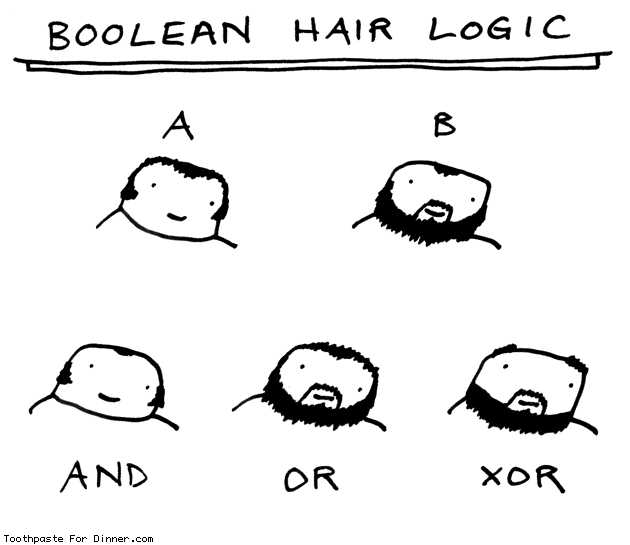
Credits: ToothpasteForDinner
Learning goals for today’s pre-class assignment
Use if/else statements with true/false (boolean) conditional statements in Python.
Write simple functions in Python
Assignment instructions
Watch any videos below, read all included and linked to content, and complete any assigned programming problems. Please get started early, and come to office hours if you have any questions and make use of Slack!
This assignment is due by 11:59 p.m. the day before class, and should be uploaded into the appropriate “Pre-class assignments” submission folder. Submission instructions can be found at the end of the notebook.
1. Making decisions in Python
Sometimes when we’re writing a program, we run into a situation where the right next step is contigent on whether or not a particular condition is true or not. If it is true, we might want to do one thing, but if it is not true, we might want to do something else entirely. This is sometimes referred to as “branching”. Basically, conditional statements, where something is evaluated to be True or False, allow Python to make decisions about how to move forward. When it comes to making decisions in Python, there are two ideas that you need to understand:
The main command in Python is the
ifstatement; or, more generally, theif-then-elseconstructBoolean logic (the conditional True/False statement) allows you to perform tests that return
TrueorFalse, which you then use to move foward.
Taken together, these two features of a programming language are essential for getting our codes to carry out complex tasks. These statments generally play a key role in data science as we often need the computer to sift through large data sets depending on what we wish to analyze.
You should also pause for a moment to reflect on that fact that you’re already been exposed to Boolean logic statement when you’ve written while loops. Basically, the while loops tells Python to keep doing the same thing until the conditional statement becomes False.
Now, to learn more about boolean logic and if statements, watch the video below.
# Don't forget to watch the video in full-screen mode!
from IPython.display import YouTubeVideo
YouTubeVideo("cozbOliNwSs",width=640,height=360) # Boolean logic and if statements2. Practice with if statements
Now that you’ve learned a bit about if statements in Python, let’s get some practice with those conditional statements!
Remember, if statements can be used for situations when we only want certain code to execute when a particular thing happens to be true.
For example, the following code loops over a range of values but only actually prints the value if the value is greater than 5. Try running the code!
# loop over the values
for i in range(11):
    # If the value is greater than 5, print it
    if i > 5:
        print(i)
6
7
8
9
10
Note that if statements can be used with any conditional statement that returns a True or False. For example, we can also do something like checking to see if a number is even. For this, we can use the modulus operator, which is a represented by a % sign in Python. When you use the % sign, Python divides the first number by the second number and returns the remainder. Try running the following code.
# loop over the values
for i in range(11):
# If the value is divisible by 2, print it
if i%2 == 0:
print(i)0
2
4
6
8
10
✅ Question 1
What is the above code doing?
✎ Put your answer here
Using and and or:
We can also perform if statements using multiple conditions. Let’s say we want all the numbers in the range from 0 to 10 that are greater than 5 and even. How might we do that? Review and run the code below. Make sure you understand what’s happening.
for i in range(11):
# If the value is greater than 5 and divisible by two, print it
# Notice that the word "and" is bold and in green, this means it serves a special purpose in Python
if (i > 5) and (i%2 == 0):
print(i)6
8
10
Now, what if we replace that and statement with an or statement? Try running the code!
for i in range(11):
# If the value is greater than five or divisible by 2, print it
# Notice that the word "or" is also bold and in green
if (i > 5) or (i%2 == 0):
print(i)0
2
4
6
7
8
9
10
✅ Question 2
How is the or statement different than the and statement? (Bonus: how does and and or relate to the hair logic comic at the top of this Notebook?)
✎ Put your answer here
✅ Task 3:
Define x to be a list of the numbers 1 through 10. Create loop that goes through all the numbers in x and, if that number is even, use a print statement to print “This number is even:” followed by the number. Put your solution in the code cell below.
# Put your code here
Inside the block vs. outside the block:
Remember that the number of spaces (or “indentation”) before a given line of code determine which “block” it is in. This is very important with if statements and can be especially confusing when nesting if statements and loops.
The code below tries to compute the sum of all the numbers from 1 to 10 that are larger than 6.
Review the code, and try to predict the output before running it.
# initializing the list
greater_than_6_list = []

for i in range(11):
    print("i equals",i)
    if i > 6:
        print("i is greater than 6")
    # appending the number that is greater than 6
    greater_than_6_list.append(i)

print("List of numbers to sum:",greater_than_6_list)
print("Sum of numbers is equal to:",sum(greater_than_6_list))
i equals 0
i equals 1
i equals 2
i equals 3
i equals 4
i equals 5
i equals 6
i equals 7
i is greater than 6
i equals 8
i is greater than 6
i equals 9
i is greater than 6
i equals 10
i is greater than 6
List of numbers to sum: [0, 1, 2, 3, 4, 5, 6, 7, 8, 9, 10]
Sum of numbers is equal to: 55
✅ Question 4
What went wrong in the code above?
✎ Put your answer here
✅ Task 5:
Copy the above code to the cell below and fix it to correctly compute the sum of the numbers greater than 6.
# Put your code here
3. More complex if statements
Sometimes just using several simple if statements in our code isn’t enough to make sure the program does what it is supposed to do. Other times even more complicated if statements that use and or or to combine multiple conditional statements aren’t sufficent either, so what do we do then?
You may often discover that you need to solve a problem that requires the code to do one thing if a particular condition is true and something else if that condition is not true. This is where the else command comes into play. Basically, the program knows to execute a certain piece of code when the if statement is true and a different piece of code for all other cases.
We can actually build even more complicated code by using the elif or “else-if” statement, which is basically a second if statement that is only executed if the first if statement was not satisfied. We can even tag an else on the end of all of that as well. Below is a diagram that helps illustrate the flow of an if-elif-else statement.
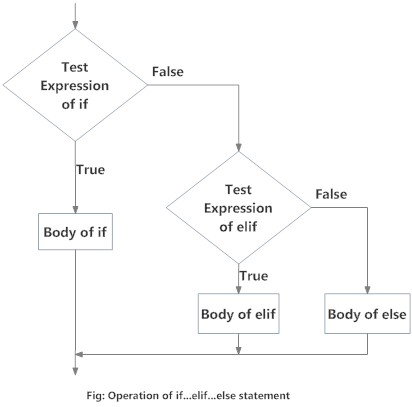
Now, watch the following video to get a sense for how all of these statements work together. The video starts out with some simple examples and then builds a progressively more complex bit of code that uses a combination of an if statement, a few elif statements, and a final else statement.
# Don't forget to watch the video in full-screen mode!
YouTubeVideo("8_wSb927nH0",width=640,height=360) # Complex if statements3.1 Time for actual data (we will build on this during the In-Class)
Let’s say that you are back in the Saguaro Lab. When keeping track of saguaro mortality, it is not just about their ages but their surroundings as well. In their paper, Orum et al (2016) mention that:
The resulting landscape consists of washes and ridges with dramatically different vegetation types. The ridges contain saguaro, foothill paloverde (Parkinsonia microphylla Torr.) and some mesquite (Prosopis velutina Woot.) whereas wash bottoms are dominated by mesquite, creosote bush (Larrea tridentata (DC) Coville), and ribbons of catclaw acacia (Acacia (Senegalia) greggii A. Gray) along watercourses, but contain few saguaro and paloverde.
Depending on the kind of plant cover around the saguaros, these are grouped into three cover classes:
Twenty-one species of plants serve as cover plants in our study plots. We have grouped them into three classes: C1) large trees (paloverde and mesquite), C2) small trees and large shrubs, and C3) small shrubs, grasses, and plants that provide minimal cover, or no cover plant at all (Table 1).
✅ Task 6
Create a for loop that loops through the list of cover plants below and prints out statements (plural) based on their cover class:
<Scientific name> is class <cover class>
Keep in mind the Table 1 from Orum:
| Cover class | Scientific name | Common name |
|---|---|---|
| C1 | Parkinsonia microphylla | Foothill paloverde |
| Prosopis velutina | Mesquite | |
| Condalia warnockii | Mexican crucillo | |
| C2 | Acacia (Vachellia) constricta | Whitethorn acacia |
| Larrea tridentata | Creosote bush | |
| Acacia (Senegalia) greggii | Catclaw acacia | |
| Ephedra sp. | Mormon tea | |
| Other species | ||
| C3 | Isocoma tenuisecta | Burroweed |
| Zinnia acerosa | Desert zinnia | |
| Psilostrophe cooperi | Paperflower | |
| Grasses |
You can use any combination of if, elif, and else statements to get the job done.
cover_plants =  ['Parkinsonia microphylla', 'Isocoma tenuisecta', 'Prosopis velutina',
                 'Acacia (Vachellia) constricta', 'Acacia (Senegalia) greggii', 'Larrea tridentata',
                 'Zinnia acerosa', 'Condalia warnockii', 'grass']

# Put your code below this comment
# It should print statements like:
# Parkinsonia microphylla is class C1
4. Introduction to functions
The last bit of this assignment is designed to get you start thinking about an extremely useful tool in Python, the Python function construct!
Functions in Python are really handy when you have a bit of code that serves a specific purpose and you want to be able to use that bit of code over and over again without having to copy and paste it repeatedly. It also means that if you need to change how that code works, you can change the code inside the function and you don’t have to change that code in several different places. Functions can also make your code much easier to read because you can compartmentalize your code into separate functions and then just call those function in the main body of your code.
4.1 What are functions and why would we use them?
Watch the following video for an overview of what functions are and why they can be extremely useful!
# Don't forget to watch the video in full-screen mode!
YouTubeVideo("kY3yMXUu5qY",width=640,height=360) # Intro to Functions!✅ Question 7
In your own words, explain what a function is and why it is a very useful tool in programming?
✎ Put your answer here!
✅ Question 8
What are the three main things that functions provide?
✎ Put your answer here!
4.2 How do we write functions in Python?
Watch the following video, to learn how functions are written in Python.
# Don't forget to watch the video in full-screen mode!
YouTubeVideo("HWzDv1UHLZo",width=640,height=360) # How do we write functions?✅ Question 9
What are the four main pieces that make up a function in Python?
✎ Put your answer here!
✅ Question 10
What is the critical term needed to initially define a function?
✎ Put your answer here!
✅ Question 11
How do you ensure that the results of your function are output in a way that will allow you to store the results in a new variable?
✎ Put your answer here!
4.3 Practice with writing functions
Watch the following video to review how you can write functions in Python. Pay attention to the different ways that you can output information from functions and input variables into functions.
# Don't forget to watch the video in full-screen mode!
YouTubeVideo("EXO3WYqlA6A",width=640,height=360) # Practice writing functions✅ Task 12
Create ( using def ) a function that returns the area of a triangle given the lengths of its base and height ( and ). Remember that . Name your function to be “get_area”.
#Put your code here
Run the function that you just created (“get_area”), and test to make sure it works in the cell below.
Since the function returns the result (instead of printing the result), you need to create a new variable to store the value returned by your function. And then print out the value of this new variable to see whether it is what you expected.
For example, if you provide the values as a=3 and b=4, the value returned by your function should be 6.
#Put your code here
4.4 Variable Scope
When writing functions (or any Python code really), we have another important consideration we have not talked about yet commonly called Variable Scope. Variable Scope refers to where and when variables can be accessed. A variable can only be accessed in the region it is created. For example, if you type a = 1 in one Jupyter notebook and then print(a) in another notebook, the print statement will throw an error.
When writing functions, the goal is for them to reusable (meaning you can use them in other notebooks), so you must ensure that the function has everything it needs to execute the function call. Any variables that the function will use should be defined as input arguments, and any variables you want to access after running the function must be returned (and saved in your notebook as a new variable!).
When you define a function in your notebook and run the cell, it is now loaded into your Jupyter notebook and can be called in any cell. It will remain defined in your notebook until you restart your Kernel or close the file. When you save the output or call the function, use unique variable names rather than overwriting previous variables. This will help your code be more clear and avoid hard-to-find bugs!
The questions below will help you explore what variable scope looks like in a Jupyter notebook.
✅ Task 13
In the cell below, we have definde three variables, favorite_animal, favorite_food, and favorite_season. Write a print() statement that prints out those three variables.
favorite_animal = 'capybara'
favorite_food = 'pozole'
favorite_season = 'Fall'

# put your code here
✅ Task 14
In the cell below, we have redefined the values of favorite_animal, favorite_food, and favorite_season.
Before you run this cell, copy and paste your print statement above into the first line of the cell and the last line of the cell. What do you notice about the output?
# copy/paste your print statement here

favorite_animal = 'otter'
favorite_food = 'Teriyaki Chicken'
favorite_season = 'Spring'

# copy/paste your print statement here too!
✅ Question 15
In the cell below, you will see some code written but perhaps a little bit confusingly. Briefly describe what you see as potentially confusing about the code.
## What makes the code below a little confusing?

favorite_animal = 'otter'
favorite_food = 'Teriyaki Chicken'
favorite_season = 'Spring'

def my_favorite_things(favorite_animal = "penguin", favorite_food = "Pizza Tree", favorite_season = "Winter"):
    string_of_favorites = "My favorite things are: " + favorite_animal + ', ' + favorite_season + ', and ' + favorite_food + "."
    return string_of_favorites

print(my_favorite_things())
print(my_favorite_things(favorite_animal, favorite_food, favorite_season))
print(my_favorite_things(favorite_food=favorite_food))
My favorite things are: penguin, Winter, and Pizza Tree.
My favorite things are: otter, Spring, and Teriyaki Chicken.
My favorite things are: penguin, Winter, and Teriyaki Chicken.
✎ Put your answer here!
✅ Question 16
In the cell below, there is a print statement that is throwing an error. Why is it throwing an error?
## Why does the code below throw an error message?

print(string_of_favorites)
---------------------------------------------------------------------------
NameError Traceback (most recent call last)
Cell In[19], line 3
1 ## Why does the code below throw an error message?
----> 3 print(string_of_favorites)
NameError: name 'string_of_favorites' is not defined✎ Put your answer here!
Important:
One of the things you should remember is that when you want a function to return a values (rather than just print it), the return command needs to go at the end of the function. The moment a function comes across a return statement, it will exit the function and ignore any code that comes later in the function.
For more information on defining functions in Python, check out these links:
Follow-up Questions
Copy and paste the following questions into the appropriate box in the assignment survey include below and answer them there. (Note: You’ll have to fill out the section number and the assignment number and go to the “NEXT” section of the survey to paste in these questions.)
In your own words, what is the propose of conditional statements (e.g.
if/elif/else) when writing code?In your own words, what makes functions a useful programming concept/tool?
In your own words, how would you define “variable scope”?
(Give it your best shot; we’ll clarify it in class) How are the
andandorstatements reflected in the boolean hair comic (the one at the start of this Notebook)?
Congratulations, you’re done!
Submit this assignment by uploading it to the course Canvas web page. Go to the “Pre-class assignments” folder, find the appropriate submission folder link, and upload it there.
See you in class!
Material drawn with permission from:
© Copyright 2023. Department of Computational Mathematics, Science and Engineering—Michigan State University
Adapted for:
© Copyright 2026, Division of Plant Science & Technology—University of Missouri
- Orum, T. V., Ferguson, N., & Mihail, J. D. (2016). Saguaro (Carnegiea gigantea) Mortality and Population Regeneration in the Cactus Forest of Saguaro National Park: Seventy-Five Years and Counting. PLOS ONE, 11(8), e0160899. 10.1371/journal.pone.0160899