✅ Put your name here.
✅ Put your group member names here.
Counting saguaros and plant covers, revisited
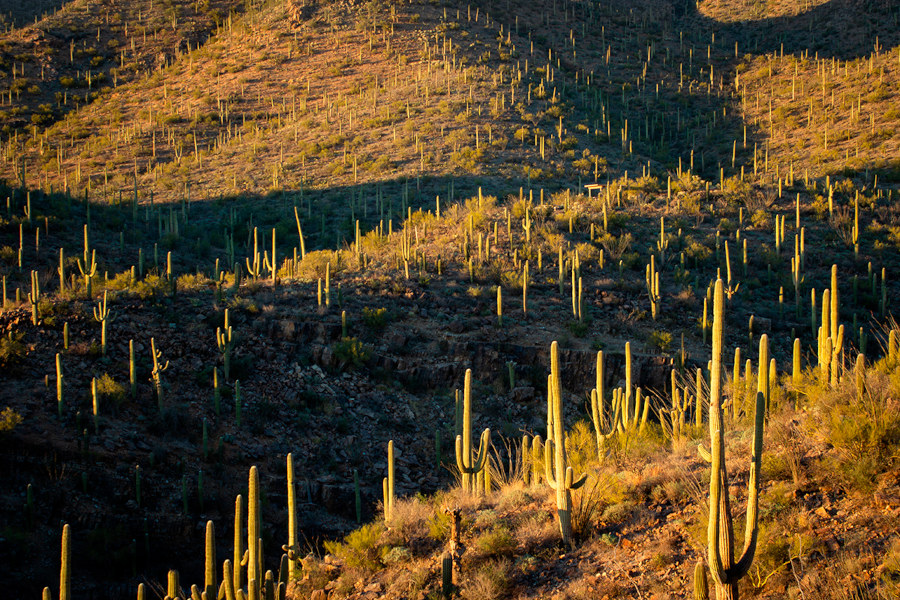
Credits: National Park Service
Learning goals for today’s assignment
Write and use functions in Python with varying types of input parameters, default parameters, and types of return values
Explore the purpose and utility of functions in writing Python code
Write and use more complex functions using Boolean logic, loops, and if/else statements
Assignment instructions
Work with your group to complete this assignment. Instructions for submitting this assignment are at the end of the Notebook. The assignment is due at the end of class.
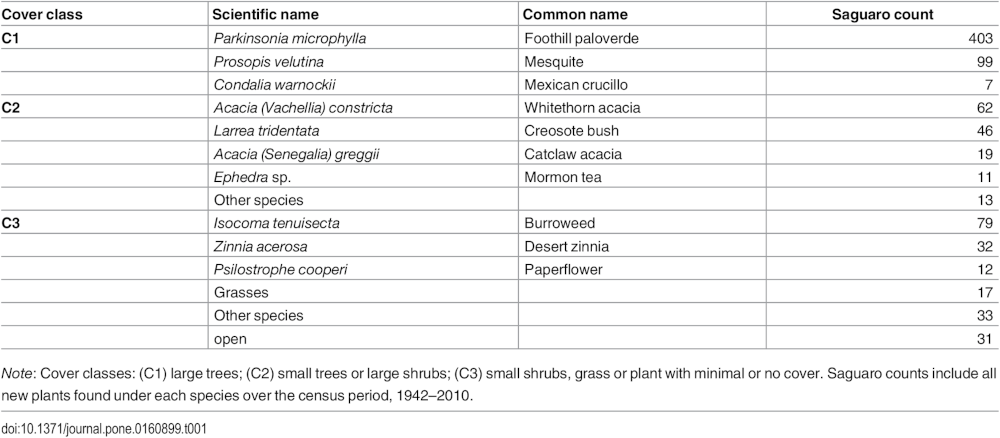
Background: Ultimately we want to reproduce this table
Credits: Orum et al (2016)
Saguaro survival during a catastrophic freeze also depends on cover as well as age. Twenty-one species of plants serve as cover plants in our study plots. We have grouped them into three classes: C1) large trees (paloverde and mesquite), C2) small trees and large shrubs, and C3) small shrubs, grasses, and plants that provide minimal cover, or no cover plant at all.
1. The joys of real-life data
In the cell below, there is a fragment of the coverplants list you used in the last in-class when looking which cover plants were reported for which saguaros.
Remember: this data comes from an actual research lab. Notice that for some saguaros, they report multiple cover plants. And when this happens, there are several ways to record it. Sometimes different plants are separated by /, other times by , , and sometimes simply by ' and '. (And I’ve already massaged it a bit for you).
This is actually a pretty common occurence when different people capture the data (because surveying a whole National Park cannot be done by a single person!).
# sample data from the cover plants for seven saguaros
coverplants = [
    'Acacia (Vachellia) constricta',
    'Larrea tridentata',
    'Parkinsonia microphylla',
    'Parkinsonia microphylla',
    'Larrea tridentata/Acacia (Vachellia) constricta',
    'Opuntia fulgida and Isocoma tenuisecta',
    'Acacia (Vachellia) constricta, Opuntia versicolor, Ferocactus wislizeni'
]
✅ Question 1
Whenever you are working with multiple people to collect data, it is good to establish ground rules on how such collection will be done.
If you could go back in time and set ground rules for data collection, what would some of those rules be?
✎ Put your answers here.
2. Fun-ception
Ultimately, you will first define two functions. You will use functio 1, to then define function 2. A function within a function as you saw in the pre-class. Fun-ception!
Pay attention to the required inputs and outputs for each function.
2.1: Function #1—Splitting a string, if applicable
Your function should do the following:
INPUT: a string
Check if the string contains separators:
'/',', ', or' and 'Use the split function
.split()to split the string if needed. pay attention to the blank spaces in the separators listed:
variable = 'cats&dogs`
print(variable.split('&'))
# This will print ['cats', 'dogs']

variable = 'cats'
print(variable.split('&'))
# This will print ['cats']
OUTPUT: a list, always
The list contains the separated items, if there was a separator present
Otherwise, the list contains the single input string.
# WRONG
output = 'cats'   # this is a string, which would be the WRONG output

# RIGHT
output = ['cats'] # this is a list (which happens to contain a string)
2.2 Planning out your Function #1
✅ Task 2
In the cell below, write out your plan for your function in plain English (commonly referred to as pseudocode). Make sure you include:
function inputs
function outputs
basic code structure (will you have loops? if/else statements? variables? are things nested?)
✎ Put your answers here.
2.3 Writing Function #1
✅ Task 3
In the cells below, you will write the first function following the indications and hints given.
# put your code here
2.4 Testing your Function
✅ Task 4
Loop through the
coverplantslistPrint the result of your function for each of the list items.
Expected output from coverplants:
['Acacia (Vachellia) constricta']
['Larrea tridentata']
['Parkinsonia microphylla']
['Parkinsonia microphylla']
['Larrea tridentata', 'Acacia (Vachellia) constricta']
['Opuntia fulgida', 'Isocoma tenuisecta']
['Acacia (Vachellia) constricta', 'Opuntia versicolor', 'Ferocactus wislizeni']Important: Notice that each of the printed outputs is a list. Also notice that there are no unnecessary blank spaces at the beginning/end of the strings within these resulting lists.
# put your test code here2.5 Writing Function #2—a list of unique values
Now that you have a working first function, you will write the second function following the indications and hints given.
INPUT: a list of string values
Create a list that can be used to keep track of the unique values. This will be your bag of unique values.
Loop over the list of all strings
For each of these strings, get another list with the split values. Use Function 1 to do this.
Now loop through this new list (a nested loop)
Use if/else statements to determine if each of the items is already in your bag of uniques.
Add unique values to your list as you find them
OUTPUT: the list of unique values
Hint: Remember that you can use in to check if a value is inside a list. You can also check if something not in a list using not in.
✅ Task 5
Code the function #2
If you’re feeling stuck, here’s some pseudocode to get started!
# define a function that takes in a list
    # declare an empty bag list
    # loop over all the input list items
        # save the result of the first function applied to the item
        # loop over the values of this new list
            # if the value is not in the bag, add it

    # return the bag list
2.6 Testing your Function
✅ Task 6
Run your second function with
coverplantsas its inputStore the resulting output list in another variable
Print this result and its length. Does it match your expectations?
Expected result:
['Acacia (Vachellia) constricta', 'Ferocactus wislizeni', 'Isocoma tenuisecta', 'Larrea tridentata', 'Opuntia fulgida', 'Opuntia versicolor', 'Parkinsonia microphylla']Hint: Python has an in-built sorted function. sorted(my_list) returns a list with the same items as my_list but in ascending order. A sorted function is easier to evaluate it by eye.
# test3. Testing on the Full Data Set
Just like in the last In-Class, we load the full dataset. Make sure that the census_saguaro_cover_classes.csv file is in the same directory as this Notebook.
# Just run this cell

import pandas as pd
df = pd.read_csv('census_saguaro_cover_classes.csv', index_col=0)
coverplants, coverclass = [ df[key].tolist() for key in ['NURSE PLANT', 'COVER CLASS']]
print(coverplants[:5])
print(coverclass[:5])
['Acacia (Vachellia) constricta', 'Parkinsonia microphylla', 'Parkinsonia microphylla', 'Parkinsonia microphylla', 'Ephedra sp.']
['C2', 'C1', 'C1', 'C1', 'C2']
✅ Task 7
Now copy/paste your code from (2.6), now with the full data set
How many different cover plant species were found in the saguaro surveys?
# Your code here
✅ Question 8
How do you know that your code is working correctly? Did your function work the first time? If so, what did you do that made it work well? If not, what changes did you need to make?
✎ Put your answers here.
4. Refining the unique lists
You should have printed a list of 32 different cover plant species. But that list includes all cover plants found for all saguaros. As we saw in previous Notebooks, it is important to keep cover classes separate for better analysis.
✅ Task 9
For cover class C1, generate a new list c1_plants: the cover plant species but only when looking at C1 class saguaros
Declare an empty
c1_plantslistLoop through the
coverplantslistIf the saguaro is class C1, append the plant to the new list
Hint: Remember that coverclass is the list with the class for each saguaro and that the indices of coverplants and coverclass match.
# Your code✅ Task 10
Compute the list of unique cover plant species that are observed when looking at C1 class saguaros.
Store and then print this list
Do you think you can simply copy/paste your Task 7 or do you think you need to edit your functions?
# Your code✅ Question 11
Is your list of unique plant species the same as the one listed in Table 1 from Orum et al (2016)?
If not, what species is extra? (Any guess of why we have an extra plant?)
✎ Put your answers here.
5. Putting it all together: Considering Other species
In the last In-Class, we were able to count the number of times a certain plant species appeared in the coverplants list. But we were limited to only look whichever species we declared beforehand. Now we have a way to know all the unique species we have registered and we can count everything now.
5.1 Counting the number of times thing show up in a list
Copy/paste your times_in_list function from last In-Class in the cell below. If you don’t have it at hand, a version of it is already below (but it is better if you use your own written code because you are already familiar with it). If you remember, this code includes partial matches. We actually want two counts: exact and partial matches.
For example, a saguaro with 'Acacia (Vachellia) constricta' cover is exactly covered by a whitethorn acacia. But a 'Larrea tridentata/Acacia (Vachellia) constricta' cover is just partial whitehorn acacia (because it is shared with creosote bush).
✅ Task 12
Rename and edit the function you just copy/pasted to return two counts instead: exact and partial matches found in the list
Hint 1: Look at the code from Part 1 from Day 05 In-Class
Hint 2: Remember that a function can return anything. You can make a list with the two counting values and return this list instead of a single number.
# Copy/paste your previously written function and delete the present code
# Only use the present code if you don't have your in-class immediately accessible

def times_in_list(name, my_list):
    counter = 0
    for item in my_list:
        if name in item:
            counter += 1
    return counter
✅ Task 13
Finally, test your newest function
Loop through the list of unique C1 cover plant species from Task 10
Print each species name along its number of exact and partial matches (as found across the full list of C1 species from Task 9)
Look back at Question 11. Do you have a better guess on why your Task10 list is different from the one in Table 1?
5.2 [Time-permitting] Excluding partial-only results
So far we have focused mostly on the C1 class saguaros. We can write a loop to go through all the classes and print all the results at once.
✅ Task 14
Write a loop that goes through Tasks 09 - 13 for classes C1 through C3
Keep a counter for all the plant species that have at least one exact match
We want to exclude species that only appear partially
Hint: It is useful to define a list with the classes names and use it for the outermost loop.
Important: You cannot use class as a variable name. But any other variation, like classes, a-ok.
# Here's some pseudocode to help you
# You should have most of the code already
# It is just a matter of copy/paste and some minor editing

classes = ['C1', 'C2', 'C3']
counter = 1
# loop through the list of classes
    # print class name
    # get a `c_plants` list as in task 9
    # get a `unique_plants` list as in task 10
    # loop through `unique_plants` as in task 13
         # get the exact and partial matches when looking in the `c_plants` list as in task 13
         # if the number of exact matches is positive
              # print the counter, plant name, the exact, and the exact + partial number of matches
              # add one to the counter
    # print('----') # this will separate class results for better visualization
We now have the counts for all the cover plants when only looking at saguaros of a specific cover class. This is why the count results are slightly different from the last in-class. We can compute the number of Other species as in Table 1.
For instance, for C2, after we exclude Acacia (Vachellia) constricta (whitethorn acacia), Larrea tridentata (creosote bush), Acacia (Senegalia) greggii (catclaw acacia), and Ephedra sp. (Mormon tea), we are left with only 13 exact counts.
Namely, Celtis pallida (7), Lycium sp. (4), and Ziziphus obtusifolia (2). (desert hackberry, wolfberry, and lotebush, respectively).
✅ Question 15
Can you do the same calculations for C3? Does the other count match with Table 1?
✎ Put your answers here.
✅ Question 16
Orum et al (2016) reads in its Mortality subsection (emphasis mine):
Saguaro survival during a catastrophic freeze also depends on cover as well as age. Twenty-one species of plants serve as cover plants in our study plots*. We have grouped them into three classes: C1) large trees (paloverde and mesquite), C2) small trees and large shrubs, and C3) small shrubs, grasses, and plants that provide minimal cover, or no cover plant at all (Table 1).
Do you actually find 21 different, unique plant species? Remember to exclude those species that have no exact matches.
Remember that the list of unique items include non-species names like “open”, “unknown” or generic terms like “composite”, “shrub”.
✎ Put your answers here.
Congratulations, you’re done!
Submit this assignment by uploading it to the course Canvas web page. Go to the “In-class assignments” folder, find the appropriate submission link, and upload it there.
See you next class!
© Copyright 2026, Division of Plant Science & Technology—University of Missouri
- Orum, T. V., Ferguson, N., & Mihail, J. D. (2016). Saguaro (Carnegiea gigantea) Mortality and Population Regeneration in the Cactus Forest of Saguaro National Park: Seventy-Five Years and Counting. PLOS ONE, 11(8), e0160899. 10.1371/journal.pone.0160899