Ugly plots and the Python Arch
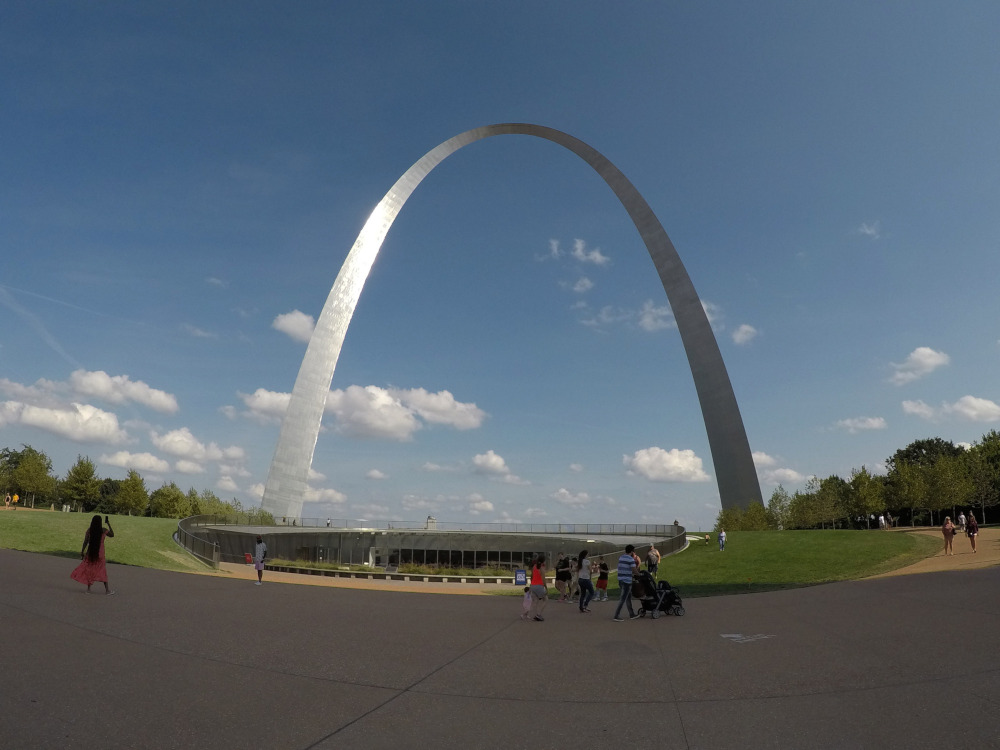
Credits: National Park Service
Learning goals for today’s assignment
Identify how Python variables are reflected and used in the Python code we used for In-Class 01
Practice a print statement for a new variable
Understand what makes a plot useful (and hence the importance of good data viz) by making an ugly plot.
Assignment instructions
Work with your group to complete this assignment. Instructions for submitting this assignment are at the end of the Notebook. The assignment is due at the end of class.
1. What is the ugliest plot you can think of?
Let’s revisit (pun not intended) the data set on Gateway Arch National Park monthly visitors. Below is a copy/paste of the code used to create a nice plot from which we can extract plenty of information at a glance.
Make sure the CSV from Day 01 is in the same folder where you have this notebook. You may need to make a copy of the CSV.
# Import libraries
# Just run this cell

import pandas as pd
import numpy as np
import matplotlib as mpl
import matplotlib.pyplot as plt
1.1 Practicing our Python
# Load the data

filename = 'Recreation Visitors By Month Gateway Arch NP.csv'
visits = pd.read_csv(filename, index_col=0)
✅ Question 1:
What kind of variable is
filename?
✎ Put your answer here! (reminder: double-click on this cell to go into “edit mode” and then hit Shift + Enter when you’re done)
✅ Task 1:
Make a new Python cell below
Display the variable
visits, i.e., just typevisitsand run the cell.What information is contained in the variable
visits?
Now run the code below to make the visits plot (the same from Day 01).
Notice in the code right above that we have specified the font size for the title for the axes, title, and legends to always be
12.You can do
Ctrl+Fto find all instances offontsize=12andlabelsize=12.
# Set up plot details

font_size = 12
color_list = ['lightgray', 'seagreen', 'indianred', 'tab:blue', 'palevioletred', 'gold', 'orange', 'gray', 'deepskyblue']
marker_list = ['o', 'D', 'P', '<', 'v', '>', '^', 's', 'X', 'h']
xaxis = list(range(visits.shape[1]))

# Making the plot pretty
fig, ax = plt.subplots(1, 1, figsize=(10,5), sharex=True)
ax.set_ylabel('No. of visitors', fontsize=font_size)
ax.set_title('Gateway Arch National Park', fontsize=font_size)
ax.set_facecolor('snow')
ax.tick_params(labelsize=font_size)
ax.set_xticks(xaxis, visits.columns)

# The actual data is plotted
for i in range(len(visits)):
    ax.plot(xaxis, visits.iloc[i], color=color_list[i], marker=marker_list[i], mec='k', ms=10, label=visits.index[i])
ax.legend(loc='upper right', fontsize=font_size, title='Year', title_fontsize='large', framealpha=1, facecolor='whitesmoke');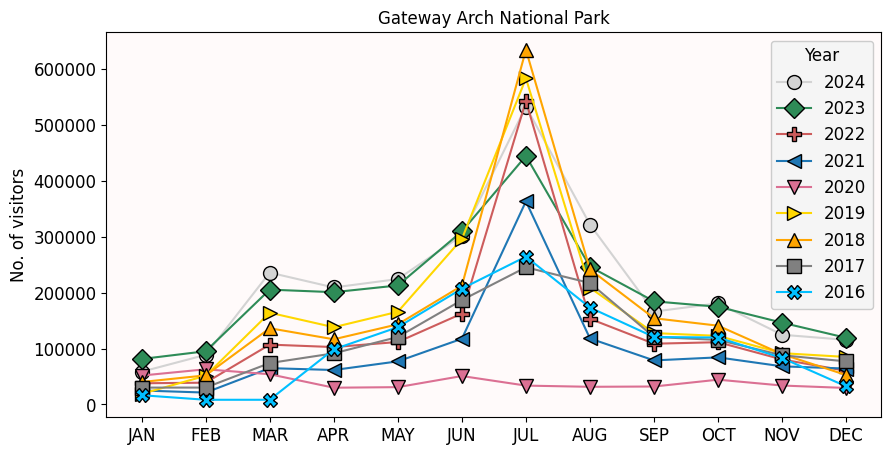
Say we want to make the fonts larger. Increase them to 15. One way to go about it would be to change manually all the 12s into 15s. But this can get tiring if we want to change the size again in the future. We could also forget a 12 here and there.
We can instead make font a single variable, and make all the axes and labels refer to it. That way, we just need to change a single variable to modify the rest of the code automatically.
✅ Task 2:
In the code above, at the top, make a new variable
fscontaining a numberMake all axes and labels refer to this new variable, that is:
Change all instances of
fontsize = 12andlabelsize = 12tofontsize = fsandlabelsize = fs, respectively.
Run the code again. Did the fontsize change as expected?
At the bottom of the cell, add a
printfunction stating the font size used to make the plot.What happens if you make
fsa big number?What happens if you make
fsa small number?
✎ Write down your observations here
1.2 Let’s make the plot worse
Sometimes, doing something “wrong” is the best way to learn to do something “right”. For instance, we can:
Remove the markers
Remove the legend
Make all the lines of similar color, sometimes repeating color, sometimes using almost invisible colors
Make the font too small so it is hard to read
Make the font of a distracting color and style
Change the foreground and background colors
Change the aspect ratio of the plot overall
Run the Python code for the cell below. How easy is to extract information from the ugly plot below compared to our previous plot?
# Run this cell. Example of ugly plot

color_list = ['black', 'slategray', 'lightslategray', 'gainsboro', 'dimgray', 'black', 'slategray', 'silver', 'whitesmoke']
xaxis = list(range(visits.shape[1]))

fig, ax = plt.subplots(1, 1, figsize=(6,6), facecolor='linen')
ax.set_ylabel('No. of visitors', fontsize=10.5, c='sienna', fontstyle='normal', fontweight=500)
ax.set_title('Gateway Arch National Park', fontsize=11, c='peru', fontstyle='normal', fontweight=500)
ax.set_facecolor('gainsboro')
ax.tick_params(labelsize=10, labelcolor='teal')
ax.set_xticks(xaxis, visits.columns)

for i in range(len(visits)):
    ax.plot(xaxis, visits.iloc[i], color=color_list[i])

#plt.savefig('ugly_plot.jpg', format='jpg', dpi=150, bbox_inches='tight');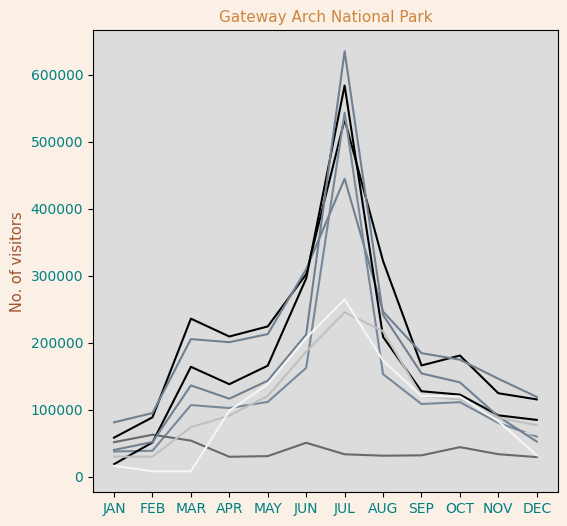
✅ Task 3: Compare and contrast
Look carefully at the code written for the pretty and ugly plots. Think of it as “spotting the 7 differences” (except I’m not 100% sure of the exact number of differences). You don’t need to know the exact code rules: we’ll learn more about them in the next class.
What things are missing?
What things are new?
✎ Some of the differences I see in the “ugly” code compared to the “pretty” one are...
✅ Task 4: Your turn to “uglify” the plot.
Now it is your turn to play around with the plot and make it even uglier. You’ll be your own judge to define “ugly”.
Colors: You can specify different colors by name. Above we used names such as
peru,linen,silver, etc. Check here for more names. Notice that colors should always be string variables.Fontsize: Just like in task 2, you can make font size a single variable for easier modification. Or you can actually different font sizes for different parts of the plot.
Aspect ratio: You can make the plot small or large based on the numbers of
figsize = ( , ). Try small and big numbers.Font style: Choose between
'normal','italic', or'oblique'. Remember these are strings.Font weight: Make it bold or dim. Choose a number between 1 and 1000
Advanced (optional): Just as you can change the font to italics or bold, you can also change it to Arial, Comic Sans, and more. Run the code below to get a list of all available fonts for Python. Then you can add the option, say,
fontname = 'Comic Sans MS'to change the font for the title or the y-axis.
# Run to print all the available fonts
print(sorted(mpl.font_manager.get_font_names()))
['AR PL KaitiM Big5', 'AR PL KaitiM GB', 'AR PL Mingti2L Big5', 'AR PL SungtiL GB', 'AR PL UMing CN', 'Abyssinica SIL', 'Accanthis ADF Std', 'Accanthis ADF Std No2', 'Accanthis ADF Std No3', 'Amiri', 'Amiri Quran', 'Amiri Quran Colored', 'Andale Mono', 'Ani', 'AnjaliOldLipi', 'Arial', 'Arial Black', 'Arimo', 'Asana Math', 'Baekmuk Batang', 'Baekmuk Dotum', 'Baekmuk Gulim', 'Baekmuk Headline', 'Berenis ADF Pro', 'Berenis ADF Pro Math', 'C059', 'Cabin', 'Caladea', 'Cantarell', 'Carlito', 'Chandas', 'Charis SIL', 'Chilanka', 'Comfortaa', 'Comic Sans MS', 'Courier New', 'Cousine', 'D050000L', 'DejaVu Math TeX Gyre', 'DejaVu Sans', 'DejaVu Sans Display', 'DejaVu Sans Mono', 'DejaVu Serif', 'DejaVu Serif Display', 'Dhurjati', 'Droid Sans Fallback', 'Dyuthi', 'EB Garamond', 'EB Garamond 12 All SC', 'EB Garamond Initials', 'EB Garamond Initials Fill1', 'EB Garamond Initials Fill2', 'EB Garamond SC', 'FontAwesome', 'FoulisGreek', 'FreeMono', 'FreeSans', 'FreeSerif', 'GFS Artemisia', 'GFS Baskerville', 'GFS BodoniClassic', 'GFS Complutum', 'GFS Didot', 'GFS Didot Classic', 'GFS Gazis', 'GFS Neohellenic', 'GFS Olga', 'GFS Porson', 'GFS Solomos', 'GFS Theokritos', 'Gargi', 'Garuda', 'Gayathri', 'Gentium', 'Gentium Basic', 'Gentium Book Basic', 'Gentium Book Plus', 'Gentium Plus', 'Gentium Plus Compact', 'GentiumAlt', 'Georgia', 'Gidugu', 'Gillius ADF', 'Gillius ADF No2', 'Go', 'Go Medium', 'Go Mono', 'Go Smallcaps', 'Gubbi', 'Gurajada', 'Hack', 'IPAGothic', 'IPAMincho', 'IPAPGothic', 'IPAPMincho', 'IPAexGothic', 'IPAexMincho', 'Impact', 'Jamrul', 'Junicode', 'KacstArt', 'KacstBook', 'KacstDecorative', 'KacstDigital', 'KacstFarsi', 'KacstLetter', 'KacstNaskh', 'KacstOffice', 'KacstOne', 'KacstPen', 'KacstPoster', 'KacstQurn', 'KacstScreen', 'KacstTitle', 'KacstTitleL', 'Kalapi', 'Kalimati', 'Karumbi', 'Keraleeyam', 'Khmer OS', 'Khmer OS System', 'Kinnari', 'LKLUG', 'LakkiReddy', 'Laksaman', 'Latin Modern Math', 'Latin Modern Mono', 'Latin Modern Mono Caps', 'Latin Modern Mono Light', 'Latin Modern Mono Light Cond', 'Latin Modern Mono Prop', 'Latin Modern Mono Prop Light', 'Latin Modern Mono Slanted', 'Latin Modern Roman', 'Latin Modern Roman Caps', 'Latin Modern Roman Demi', 'Latin Modern Roman Dunhill', 'Latin Modern Roman Slanted', 'Latin Modern Roman Unslanted', 'Latin Modern Sans', 'Latin Modern Sans Demi Cond', 'Latin Modern Sans Quotation', 'Lato', 'Liberation Mono', 'Liberation Sans', 'Liberation Sans Narrow', 'Liberation Serif', 'Likhan', 'Linux Biolinum Keyboard O', 'Linux Biolinum O', 'Linux Libertine Display O', 'Linux Libertine Initials O', 'Linux Libertine Mono O', 'Linux Libertine O', 'Lobster Two', 'Lohit Assamese', 'Lohit Bengali', 'Lohit Devanagari', 'Lohit Gujarati', 'Lohit Gurmukhi', 'Lohit Kannada', 'Lohit Malayalam', 'Lohit Odia', 'Lohit Tamil', 'Lohit Tamil Classical', 'Lohit Telugu', 'Loma', 'Mallanna', 'Mandali', 'Manjari', 'Meera', 'Mitra ', 'Mukti', 'NATS', 'NTR', 'Nakula', 'Navilu', 'Nimbus Mono PS', 'Nimbus Roman', 'Nimbus Sans', 'Nimbus Sans Narrow', 'Norasi', 'Noto Kufi Arabic', 'Noto Looped Lao', 'Noto Looped Thai', 'Noto Mono', 'Noto Music', 'Noto Naskh Arabic', 'Noto Nastaliq Urdu', 'Noto Rashi Hebrew', 'Noto Sans', 'Noto Sans Adlam', 'Noto Sans Adlam Unjoined', 'Noto Sans Anatolian Hieroglyphs', 'Noto Sans Arabic', 'Noto Sans Armenian', 'Noto Sans Avestan', 'Noto Sans Balinese', 'Noto Sans Bamum', 'Noto Sans Bassa Vah', 'Noto Sans Batak', 'Noto Sans Bengali', 'Noto Sans Bhaiksuki', 'Noto Sans Brahmi', 'Noto Sans Buginese', 'Noto Sans Buhid', 'Noto Sans CJK JP', 'Noto Sans Canadian Aboriginal', 'Noto Sans Carian', 'Noto Sans Caucasian Albanian', 'Noto Sans Chakma', 'Noto Sans Cham', 'Noto Sans Cherokee', 'Noto Sans Coptic', 'Noto Sans Cuneiform', 'Noto Sans Cypriot', 'Noto Sans Deseret', 'Noto Sans Devanagari', 'Noto Sans Display', 'Noto Sans Duployan', 'Noto Sans Egyptian Hieroglyphs', 'Noto Sans Elbasan', 'Noto Sans Elymaic', 'Noto Sans Ethiopic', 'Noto Sans Georgian', 'Noto Sans Glagolitic', 'Noto Sans Gothic', 'Noto Sans Grantha', 'Noto Sans Gujarati', 'Noto Sans Gunjala Gondi', 'Noto Sans Gurmukhi', 'Noto Sans Hanifi Rohingya', 'Noto Sans Hanunoo', 'Noto Sans Hatran', 'Noto Sans Hebrew', 'Noto Sans Imperial Aramaic', 'Noto Sans Indic Siyaq Numbers', 'Noto Sans Inscriptional Pahlavi', 'Noto Sans Inscriptional Parthian', 'Noto Sans Javanese', 'Noto Sans Kaithi', 'Noto Sans Kannada', 'Noto Sans Kayah Li', 'Noto Sans Kharoshthi', 'Noto Sans Khmer', 'Noto Sans Khojki', 'Noto Sans Khudawadi', 'Noto Sans Lao', 'Noto Sans Lepcha', 'Noto Sans Limbu', 'Noto Sans Linear A', 'Noto Sans Linear B', 'Noto Sans Lisu', 'Noto Sans Lycian', 'Noto Sans Lydian', 'Noto Sans Mahajani', 'Noto Sans Malayalam', 'Noto Sans Mandaic', 'Noto Sans Manichaean', 'Noto Sans Marchen', 'Noto Sans Masaram Gondi', 'Noto Sans Math', 'Noto Sans Mayan Numerals', 'Noto Sans Medefaidrin', 'Noto Sans Meetei Mayek', 'Noto Sans Mende Kikakui', 'Noto Sans Meroitic', 'Noto Sans Miao', 'Noto Sans Modi', 'Noto Sans Mongolian', 'Noto Sans Mono', 'Noto Sans Mro', 'Noto Sans Multani', 'Noto Sans Myanmar', 'Noto Sans NKo', 'Noto Sans Nabataean', 'Noto Sans New Tai Lue', 'Noto Sans Newa', 'Noto Sans Nushu', 'Noto Sans Ogham', 'Noto Sans Ol Chiki', 'Noto Sans Old Hungarian', 'Noto Sans Old Italic', 'Noto Sans Old North Arabian', 'Noto Sans Old Permic', 'Noto Sans Old Persian', 'Noto Sans Old Sogdian', 'Noto Sans Old South Arabian', 'Noto Sans Old Turkic', 'Noto Sans Oriya', 'Noto Sans Osage', 'Noto Sans Osmanya', 'Noto Sans Pahawh Hmong', 'Noto Sans Palmyrene', 'Noto Sans Pau Cin Hau', 'Noto Sans PhagsPa', 'Noto Sans Phoenician', 'Noto Sans Psalter Pahlavi', 'Noto Sans Rejang', 'Noto Sans Runic', 'Noto Sans Samaritan', 'Noto Sans Saurashtra', 'Noto Sans Sharada', 'Noto Sans Shavian', 'Noto Sans Siddham', 'Noto Sans SignWriting', 'Noto Sans Sinhala', 'Noto Sans Sogdian', 'Noto Sans Sora Sompeng', 'Noto Sans Soyombo', 'Noto Sans Sundanese', 'Noto Sans Syloti Nagri', 'Noto Sans Symbols', 'Noto Sans Symbols2', 'Noto Sans Syriac', 'Noto Sans Tagalog', 'Noto Sans Tagbanwa', 'Noto Sans Tai Le', 'Noto Sans Tai Tham', 'Noto Sans Tai Viet', 'Noto Sans Takri', 'Noto Sans Tamil', 'Noto Sans Tamil Supplement', 'Noto Sans Telugu', 'Noto Sans Thaana', 'Noto Sans Thai', 'Noto Sans Tifinagh', 'Noto Sans Tifinagh APT', 'Noto Sans Tifinagh Adrar', 'Noto Sans Tifinagh Agraw Imazighen', 'Noto Sans Tifinagh Ahaggar', 'Noto Sans Tifinagh Air', 'Noto Sans Tifinagh Azawagh', 'Noto Sans Tifinagh Ghat', 'Noto Sans Tifinagh Hawad', 'Noto Sans Tifinagh Rhissa Ixa', 'Noto Sans Tifinagh SIL', 'Noto Sans Tifinagh Tawellemmet', 'Noto Sans Tirhuta', 'Noto Sans Ugaritic', 'Noto Sans Vai', 'Noto Sans Wancho', 'Noto Sans Warang Citi', 'Noto Sans Yi', 'Noto Sans Zanabazar Square', 'Noto Serif', 'Noto Serif Ahom', 'Noto Serif Armenian', 'Noto Serif Balinese', 'Noto Serif Bengali', 'Noto Serif CJK JP', 'Noto Serif Devanagari', 'Noto Serif Display', 'Noto Serif Dogra', 'Noto Serif Ethiopic', 'Noto Serif Georgian', 'Noto Serif Grantha', 'Noto Serif Gujarati', 'Noto Serif Gurmukhi', 'Noto Serif Hebrew', 'Noto Serif Hmong Nyiakeng', 'Noto Serif Kannada', 'Noto Serif Khmer', 'Noto Serif Khojki', 'Noto Serif Lao', 'Noto Serif Malayalam', 'Noto Serif Myanmar', 'Noto Serif Sinhala', 'Noto Serif Tamil', 'Noto Serif Tamil Slanted', 'Noto Serif Tangut', 'Noto Serif Telugu', 'Noto Serif Thai', 'Noto Serif Tibetan', 'Noto Serif Yezidi', 'Noto Traditional Nushu', 'Open Sans', 'Open Sans Condensed', 'OpenSymbol', 'P052', 'Padauk', 'Padauk Book', 'Pagul', 'Peddana', 'Phetsarath OT', 'Ponnala', 'Pothana2000', 'Potti Sreeramulu', 'Purisa', 'Rachana', 'RaghuMalayalamSans', 'Ramabhadra', 'Ramaraja', 'Rasa', 'RaviPrakash', 'Rekha', 'Roboto', 'Roboto Condensed', 'STIX', 'STIX Math', 'STIXGeneral', 'STIXIntegralsD', 'STIXIntegralsSm', 'STIXIntegralsUp', 'STIXIntegralsUpD', 'STIXIntegralsUpSm', 'STIXNonUnicode', 'STIXSizeFiveSym', 'STIXSizeFourSym', 'STIXSizeOneSym', 'STIXSizeThreeSym', 'STIXSizeTwoSym', 'STIXVariants', 'Saab', 'Sahadeva', 'Samanata', 'Samyak Devanagari', 'Samyak Gujarati', 'Samyak Malayalam', 'Samyak Tamil', 'Sarai', 'Sawasdee', 'Sree Krushnadevaraya', 'Standard Symbols PS', 'Suranna', 'Suravaram', 'Suruma', 'Syamala Ramana', 'TeX Gyre Adventor', 'TeX Gyre Bonum', 'TeX Gyre Bonum Math', 'TeX Gyre Chorus', 'TeX Gyre Cursor', 'TeX Gyre DejaVu Math', 'TeX Gyre Heros', 'TeX Gyre Heros Cn', 'TeX Gyre Pagella', 'TeX Gyre Pagella Math', 'TeX Gyre Schola', 'TeX Gyre Schola Math', 'TeX Gyre Termes', 'TeX Gyre Termes Math', 'TenaliRamakrishna', 'Tibetan Machine Uni', 'Times New Roman', 'Timmana', 'Tinos', 'Tlwg Mono', 'Tlwg Typewriter', 'Tlwg Typist', 'Tlwg Typo', 'Trebuchet MS', 'URW Bookman', 'URW Gothic', 'Ubuntu', 'Ubuntu Condensed', 'Ubuntu Mono', 'Umpush', 'UnBatang', 'UnDinaru', 'UnDotum', 'UnGraphic', 'UnGungseo', 'UnJamoBatang', 'UnJamoDotum', 'UnJamoNovel', 'UnJamoSora', 'UnPen', 'UnPenheulim', 'UnPilgi', 'UnPilgia', 'UnShinmun', 'UnTaza', 'UnVada', 'UnYetgul', 'Universalis ADF Std', 'Uroob', 'Vemana2000', 'Verdana', 'Waree', 'Webdings', 'Yrsa', 'Z003', 'aakar', 'cmb10', 'cmex10', 'cmmi10', 'cmr10', 'cmss10', 'cmsy10', 'cmtt10', 'mry_KacstQurn', 'ori1Uni', 'padmaa', 'padmaa-Bold.1.1']
✅ Task 5: What makes a plot ugly?.
In the cell below reflect about:
What distinguishes a “good” plot from a “bad” plot?
What ugly features have your classmates considered?
What other things would you like to change in your plot to make it uglier? (Python is quite flexible and almost any edit/change you can think of is possible).
✎ Your thoughts
✅ Task 6: Saving and sharing your ugly plot.
Once you are done with your ugly-ness, uncomment the last line of the plot code:
plt.savefig('ugly_plot.jpg', format='jpg', dpi=150, bbox_inches='tight');This should generate a JPG file in the same folder as this Notebook.
Copy/paste your JPG in the shared slides (link in Canvas) alongside your name.
Be ready to tell us what makes your plot uniquely ugly!
Congratulations, you’re done!
Submit this assignment by uploading it to the course Canvas web page. Go to the “Assignments” folder, find the appropriate submission folder link, and upload it there.
See you in class!
© Copyright 2026, Division of Plant Science & Technology—University of Missouri