✅ Put your name here

Lists and loopy loops
Credits: tenor.com
Learning goals for today’s pre-class assignment
Create and manipulate lists in Python
Write
forloops andwhileloops in PythonCombine lists and loops to compute new values.
Assignment instructions
Read this notebook, watch the videos below and complete the assigned programming problems. Please get started early, and come to office hours if you have any questions!
Recall that to make notebook cells that have Python code in them do something, hold down the Shift key and then press the Enter key (you’ll have to do this to get the YouTube videos to run). To edit a cell (to add answers, for example) you double-click on the cell, add your text, and then enter it by holding down Shift and pressing enter.
This assignment is due by 11:59 p.m. the day before class and should be uploaded into the “Pre-Class Assignments” dropbox folder for Day 3. Submission instructions can be found at the end of the Notebook.
REMINDER on Generative AI Usage
To ensure that you are starting to build a strong basis in foundational concepts, please do not use Generative AI (chatGPT, Dall-E, Claude, Co-pilot, etc.) at this time. We will introduce how to use them in support of your learning soon!
However, feel free to post in Slack, talk with your peers and instructors, and use the resources below:
Keyboard shortcuts!
If you want to start using keyboard shortcuts in Jupyter Notebooks to make your life easier and more efficient, try pressing ESC to enter command mode and then press Ctrl + Shift + H. This will bring up the list of the keyboard shortcuts. Some of the useful shortcuts include A and B, which insert cells into the notebook “above” and “below” the current cell, respectively. X is also useful for cutting out cells that you don’t need.
1. Lists in Python
One very useful data type/container in Python is the “list”. A list is considered a “mutable” Python data type which means that once you create a list, you are free to change the contents of that list. Lists are also handy because they can store pretty much any other type of python variable within them -- including other lists! Creating lists of lists can actually be extremely handy at times. The following table should serve as a simple reference guide for lists. Note that you might have to scroll side to the side to see the whole table.
| Container Type | Mutable or Immutable | Initialization Without Values | Initializtion With Values | Adding Values to Container | Removing Values from Container | Modifying Values | Access Method | Notable Operations and Additional Information |
|---|---|---|---|---|---|---|---|---|
| List | Mutable |
| a=['1', '2', '3'] |
| list.remove(item) #removes the first instance of 'item' from the list. If there is not such an element, this will cause an error | >>> a[0] = 'cat' >>> a ['cat', '2', '3'] | Access by index: >>> a[0] 1 | See webpage at here for some helpful methods when dealing with lists. |
# Imports the functionality that we need to display YouTube videos in a Jupyter notebook.
# You need to run this cell before you run ANY of the YouTube videos.
from IPython.display import YouTubeVideo

# Watch this video to learn about the list type in Python
YouTubeVideo("TJ_bGrigAMg",width=640,height=360)We can think of a list like multiple containers placed side by side in a line. Each container in our list has an index that tells us where that container lies in relation to the other containers in the list. Within each container lies a piece of data that could be any Python variable type. We typically refer to these pieces of data as the values of the list.
Here’s an example list: [7, 24.5, "class"]. We can think about this list as three containers next to each other with each container containing a single element from this list. So for this list, we have a container at the index 0 with the value of 7, a container at the index 1 with the value 24.5, and a container with the index 2 with the value “class” (remembering Python indexing starts at 0!).
✅ Task 1: My first list
In the cell below, create a list that contains, in this order:
Your first name as a string
Your age as a floating-point number in years. Include one decimal point of precision and a comment about how you calculated the decimal value.
The number of credits you are taking this semester at MU as an integer.
Then:
Print this list out.
Replace your first name in the list with your last name, and replace your age with the current year as an integer. Use indexing to change these values! That means use something like “
mylist[0] =” wheremylistis whatever you named your list. After the equal sign, put your new value for that item in the list.Append one or more new variables (anything you like), print out the length of the list using the len() function, and then print out the entire list again.
# Write your program here, using multiple cells if necessary. Add extra cells using
# the 'Cell' menu at the top of this notebook or by using the keyboard shortcut. Don't forget that you can execute
# your program by holding down 'shift' and pressing 'enter' in each cell!
2. for loops and while loops
Computers are really good at performing repetitive tasks. The loop structure is ideal whenever we have to perform the a sequence of very repetitive/similar tasks.
2.1 for loops
Watch the following video, which introduces the concepts of for loops and how they work in Python. After you watch the video, answer the questions below.
# Video on "for" loops in Python
# Make sure to watch it in full-screen mode!
YouTubeVideo("VnTN5sFIPD0",width=640,height=360,end=629)✅ Task 2: My first for
Write a
forloop that prints the numbers 0 through 9 in the cell below.
# put your code here!
✅ Task 3: My second for:
Write a
forloop that iterates through the items in thegrab_baglist provided in the cell below and prints each item.
grab_bag = ["PLNT_SCI", 2500, "Section 001", "Ag Eng Building",
            "pre-class", 3,  "in-class", "Jupyter", "Room 168",
            "saguaro", "flipped classroom"]

# put your code here!
✅ Task 4
Looking at Tasks 2 and 3, answer the following questions:
What type of information did you loop over? Explain the code that you wrote in plain English.
Are there differences between the structure of the loops that you wrote for Questions 2 and 3? If not, how else could you have completed Question 3 such that the structure would be different?
✎ Put your answer here
2.2 Index vs Value
Remember the container idea we mentioned above?
In for loops, we can access the values in a list by the value itself or by the index of the container. For example, if you answered Task 3 with the structure of
for value in list:you accessed the values each container directly. We could also access the values in the container by using the index of where the container lies in list. In some sense, we are saying “find the container at this index and return the value in that container.”
Looking at the list in Task 3, let’s say we want to know which indices contain a section name. So, now we need to know the index and the value of the list at that index. In order to use the index to look through our list, we need to know how many total containers there are in the list. And since indices are numbers, we can easily use the range function from above. Since we want to loop through all the containers in the list, we start at 0 and end at the total number of containers in the list. Then, we print the index and the value of the list at that index.
Here’s what that looks like:
for i in range(0, len(grab_bag)): #this can also be written for i in range(len(cmse_grab_bag)):
   print(i, grab_bag[i])
0 PLNT_SCI
1 2500
2 Section 001
3 Ag Eng Building
4 pre-class
5 3
6 in-class
7 Jupyter
8 Room 168
9 saguaro
10 flipped classroom
We can see that the two section names are located at index 2 and index 8. While this is a simple example, it can easily be expanded to other situations.
Now you might be asking, when do I loop by index and when do I loop by the value? Here’s some tips:
If you only need to access the values in a single list, without any of the index information, the
for value in list:structure is most likely the way to go.As your code gets more complicated, we often use the
for i in range(len(list)):structure. Some examples are:When you need the index information, like above
When you want to access values at the same index in multiple lists
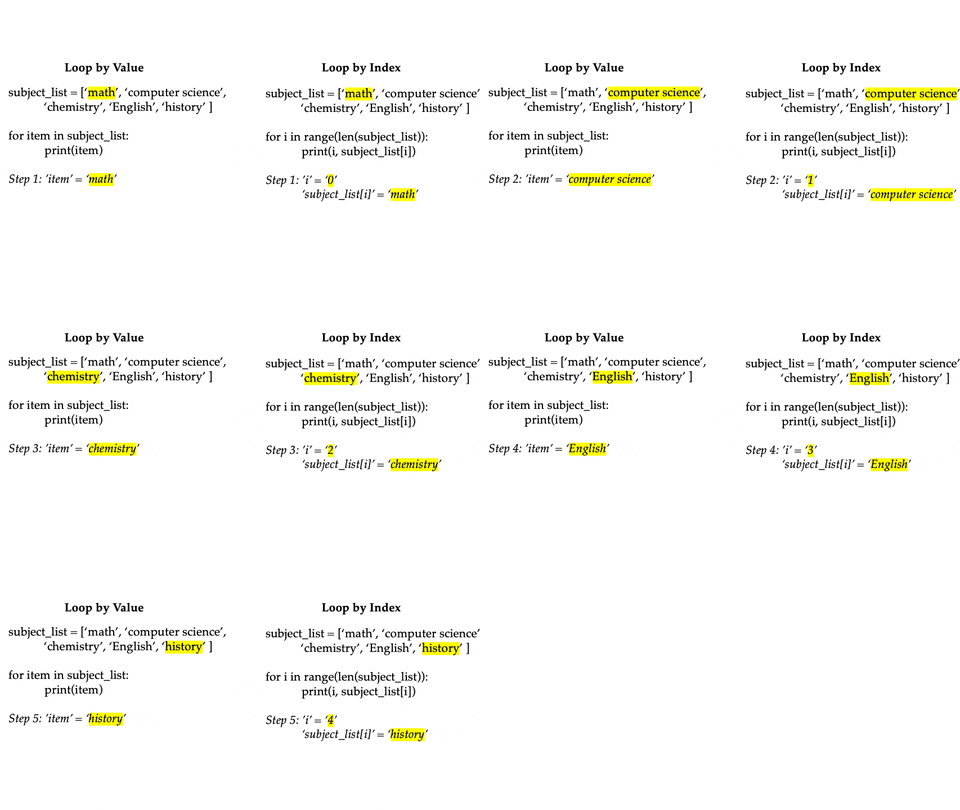
The GIF below shows the difference between looping over the value versus the index. Notice that the lists and the output for each are the same.
✅ Task 5: In your own words
Before moving on to while loops, explain the idea of an index to a someone who has never coded before.
✎ Put your answer here
2.3 while loops
Watch the following video clip, which introduces the concept of while loops in Python. After you watch the video, answer the questions below.
Note: Ignore the little bit at the end of the video clip that mentions NumPy arrays and the nditer function.
# Video on "while" loops in Python
# Make sure to watch it in full-screen mode!
YouTubeVideo("VnTN5sFIPD0",width=640,height=360,start=823)✅ Task 6. My first while
Write a
whileloop that starts with a value ofx = 2, on each iteration multiplesxby 2, prints the value ofx, and keeps running untilxis greater than 4096.
Caution: When working with while loops it is easy to accidentally create an “infinite” loop that runs forever. If you do this the notebook will get stuck on a cell (appearing as In [*]: on the left). The best way to fix this is to select “Interrupt” from the Kernel menu above.
# put your code here!✅ Task 7. In your own words:
Now that you have worked with both for and while loops,
What are the main differences between them?
How would you explain the difference to a friend who did not get to watch the videos in this lesson?
✎ Put your answer here
3. Combining lists and loops.
✅ Task 8. Bring it all together:
Now we want you to try to use various components of everything you just learned to calculate some values. The cell below includes two lists of values, x and y. Your task is to:
Initialize one new empty list,
addition,Iterate through the two lists of values,
xandy, using a loop to compute ,Store these values in your new list.
Once you’ve computed all the values, print out the results.
Hint: If you take a look at the table in Part 1 that contains information about lists, you see that it mentions adding values to a list using .append(), this is what you’ll want to use to fill in your addition list. Also, remember that we use ** to compute powers in Python. So “2 squared” would be 2**2.
x = [2,4,6,8,10,12,14,16,18]
y = [10,8.25,7.5,7,6.5,7,7.5,8.25,10]

# Put your commands for intializing your new list below this comment


# Put your loop for computing x+y below these comments.
# You'll be using .append() to add new values to the lists you just initialized.
4. [OPTIONAL] Challenge Problem
If you have prior knowledge of Python and/or felt confident on the concepts in the rest of this assignment, give this challenge a try! We will revisit nested loops in more detail later on in the semester.
✅ Task 9. Nested Loops
In the cell below is an example of a “nested loop.” Beginning with your code from Task 8 (and using the nested loop example below as a reference), write a loop inside your loop from Task 8 that calculates for every value of (i.e. your inner loop should be over the list of y-values) and appends it to a new list xy_squared. In your outer loop, print out that list.
If you’ve done this correctly, then the first list you get should look like the following:
[144, 105.0625, 90.25, 81, 72.25, 81, 90.25, 105.0625, 144]which is
The next list should be the result of
because you should move on to the next value in the x list. This will look like:
[196, 150.0625, 132.25, 121, 110.25, 121, 132.25, 150.0625, 196]And so on and so forth.
Yes, this might seem a bit complicated: that’s totally expected. After all, you’re still learning to write code! If you find yourself spending too much time to figure this out, make use of Slack or try to drop by office hours or help room hours. Making sure that you spend time on your own trying to work through Pre-Class activities like this one are important for making your time in class as productive as possible.
# Nested Loop example from https://pynative.com/python-nested-loops/
lines = 5
# outer loop
for line in range(1, lines + 1):
    # inner loop
    for idx in range(1, line + 1):
        print("#", end=" ") # print statement that does not make a new line each time
    print('\n') # add a new line between each iteration of the outer loop
#
# #
# # #
# # # #
# # # # #
Before you write any code for solving the problem, answer these questions:
What information do you need from each list?
How are you going to access that information?
Once you have the information, what are you going to do with it?
✎ Put your answer here
# Once you've spelled your ideas out, put your code hereFollow-up Questions
Copy and paste the following questions into the appropriate box in the assignment survey include below and answer them there. (Note: You’ll have to fill out the section number and the assignment number and go to the “NEXT” section of the survey to paste in these questions.)
If you had a list variable called
directory, how you would access the fourth element in this list?Explain when you might use a
forloop versus awhileloop.
Congratulations, you’re done!
Submit this assignment by uploading it to the course Canvas web page. Go to the “Pre-class assignments” folder, find the appropriate submission folder link, and upload it there.
See you in class!
Material drawn with permission from:
© Copyright 2023. Department of Computational Mathematics, Science and Engineering—Michigan State University
Adapted for:
© Copyright 2026, Division of Plant Science & Technology—University of Missouri