✅ Put your name here

Flipping classrooms and Python basics
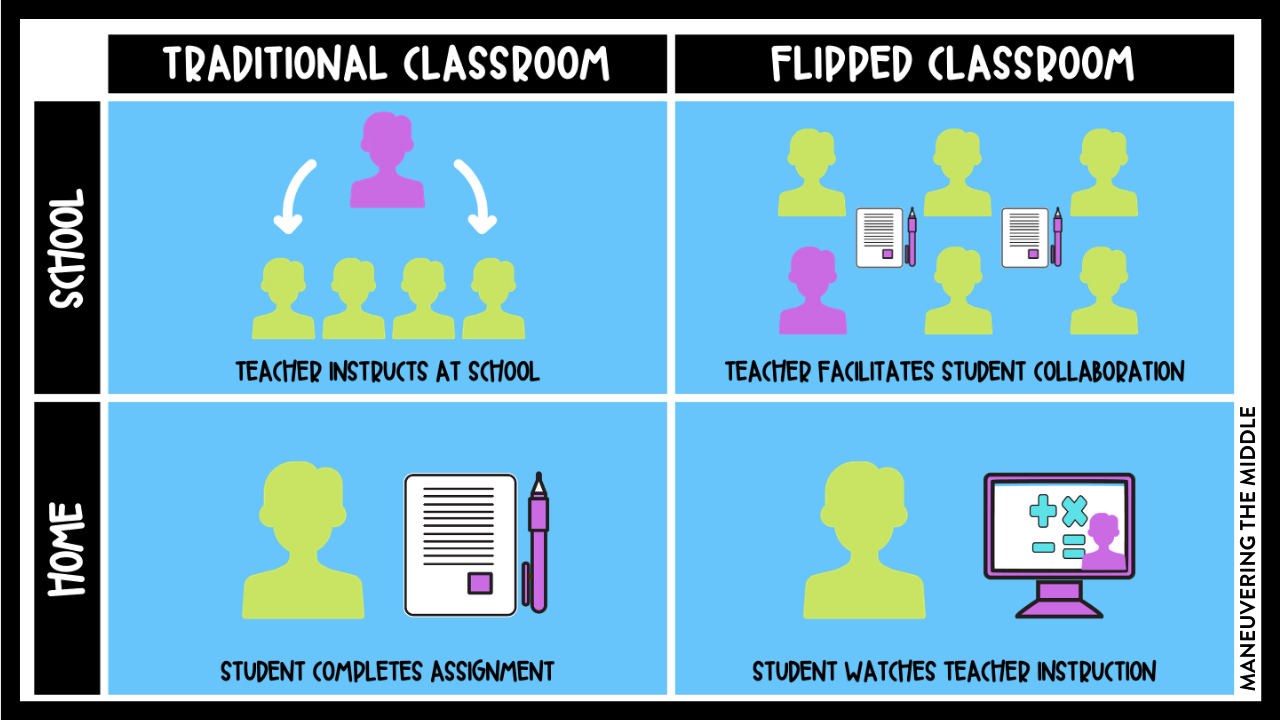
Credits: Maneuvering the Middle
Learning goals for today’s pre-class assignment
Explore the nature of flipped classrooms and why we used a flipped classroom model in PLNT_SCI 2500
Learn more about Jupyter notebooks and Markdown
Get familiar with some of the plotting options in Python
Assignment instructions
Read this notebook, watch the videos below and complete the assigned programming problems. Please get started early, and come to office hours if you have any questions!
Recall that to make notebook cells that have Python code in them do something, hold down the Shift key and then press the Enter key (you’ll have to do this to get the YouTube videos to run). To edit a cell (to add answers, for example) you double-click on the cell, add your text, and then enter it by holding down Shift and pressing enter.
This assignment is due by 11:59 p.m. the day before class and should be uploaded into the “Pre-Class Assignments” dropbox folder for Day 2. Submission instructions can be found at the end of the Notebook.
NOTE on Generative AI Usage
To ensure that you are starting to build a strong basis in foundational concepts, please do not use Generative AI (chatGPT, Dall-E, Claude, Co-pilot, etc.) at this time. We will introduce how to use them in support of your learning soon!
However, feel free to post in Slack, talk with your peers and instructors, and use the resources below:
1. What is a Flipped Classroom?
One aspect of PLNT_SCI 2500 that is very important to understand, aside from Python programming, is understanding how the class is structured. PLNT_SCI 2500 is being taught using what is known as the “flipped classroom” model. This may or may not be familiar to you, so watch the following video on what a flipped classroom is to help you get up to speed.
Run the cell below by hitting Shift + Enter to watch the video.
# Watch this short video to get an overview of what a "flipped" classroom is
from IPython.display import YouTubeVideo
YouTubeVideo("ojiebVw8O0g",width=640,height=360)In short, a flipped classroom has students spending time outside of class working through instructional materials developed by the professor known as pre-class assignments. In the context of this course, this will entail things such as watching video lectures made by the instructional staff or found online, reading articles, and working through structured coding activities. One benefit to doing this is it allows students to learn from these materials at their own pace. During a lecture, students must work at the pace of whoever is giving the lecture. But here, one can rewind videos as needed, reread passages, or move past material they feel they have already mastered.
The main purpose of the work being done at home is so that the time in class can be spent working on what would have traditionally been labeled as "homework assignments" with other students in this class. We will be referring to these as “in-class assignments.” During these in-class assignments, the instructional staff are there to provide focused support where needed and help to alleviate any confusion surrounding the material. This model of instruction allows for students to get more one-on-one attention from teachers as well as additional support that comes from working with other people.
The classroom is "flipped" in the sense that what would have traditionally been done in class (e.g. lecturing) is now being done at home (pre-class assignments), and the aspects that would normally be done at home (in-class assignments) is being worked on during class where the instructional staff can provide needed support.
The rationale for adopting this model in the specific context of our course is so that time outside of class can be spent learning about the underlying concepts of computational modeling and data analysis, and in-class time can be spent doing computational modeling and data analysis.
This approach to learning might be quite different than what you are used to, especially if most of your prior classes have used traditional lecture formats. However, although this classroom experience is different, the end result will still be the same -- you will learn the content! In fact, research has shown that there are many benefits to learning in a flipped classroom and many times students learn more than they would in a more traditional classroom.
Of course, in order to get the most of out of the flipped classrooms model used by PLNT_SCI 2500, you need to complete the pre-class assignments and fully engage with the in-class activities. If you don’t invest the time before coming to class, you will find that the in-class activities are much more challenging.
Your instructor is happy to answer any question on how the flipped model will work!
2. Working on Python fundamentals
2.1 Jupyter notebooks and Markdown
The following video will provide you with a bit more information about Jupyter notebooks, how they work, and how you can use them to write both code and text. Note that when you execute the cell below, the code will run only a portion of the video, going from ˜3:30 to ˜11:30. You only need to watch that portion of the video as the rest of the video is related to material from past versions of the course.
# Watch this video to learn about Markdown in Jupyter notebooks
# Please get familiar with this, since we will be using these all semester
YouTubeVideo("zSDfRY8-3QE",width=640,height=360,start=202,end=719)✅ Task 1
Create a cell below, write your first name in italics and last name in bold.
2.2 Python 101
Watch the following video to see an example of how to write a very simple piece of code in Python. Remember that the area of a circle of radius is given by the formula
# Write a simple Python program by example
YouTubeVideo("cCLB1sNpNYo",width=640,height=360)✅ Task 2
In the cell below, write a simple program to calculate the area of a rectangle, where you give it the length and width of the rectangle as variables, store the area in a third variable and print it out. Add comments to each line (using #) to explain what you’re doing!
Remember that the area of a rectangle of length and width is .
# Write your Python program here.  Don't forget that you execute your program by holding
# down 'shift' and pressing 'enter'
2.3 Variable types
Watch the following video to learn a bit about variable types in Python
# Watch this video to learn about some fundamental Python variable types
YouTubeVideo("yv7klK57Ezc",width=640,height=360)✅ Task 3:
In the cells below,
Create a variable containing a floating-point number and a second variable containing an integer.
Turn both into strings, concatenate them, and store the result in a new variable.
Print out the last value in your concatenated variable.
You can use more than one cell if you need to print out multiple quantities!
# Write your program here, using multiple cells if necessary. Add extra cells using
# the 'Cell' menu at the top of this notebook.  Don't forget that you can execute
# your program by holding down 'shift' and pressing 'enter' in each cell!
Follow-up Questions
Copy and paste the following questions into the appropriate box in the assignment survey include below and answer them there. Feel free to scroll up and review contents. (Note: Choose the right assignment number and go to the “NEXT” section of the survey to paste in these questions.)
Why does PLNT SCI 2500 use a “flipped classroom”?
When might you use a “string” variable type versus an “integer” variable type in Python?
What symbol do you use to include “comments” in your Python code?
Congratulations, you’re done!
Submit this assignment by uploading it to the course Canvas web page. Go to the “Pre-class assignments” folder, find the appropriate submission folder link, and upload it there.
See you in class!
Material drawn with permission from:
© Copyright 2023. Department of Computational Mathematics, Science and Engineering—Michigan State University
Adapted for:
© Copyright 2026, Division of Plant Science & Technology—University of Missouri